Get in Touch

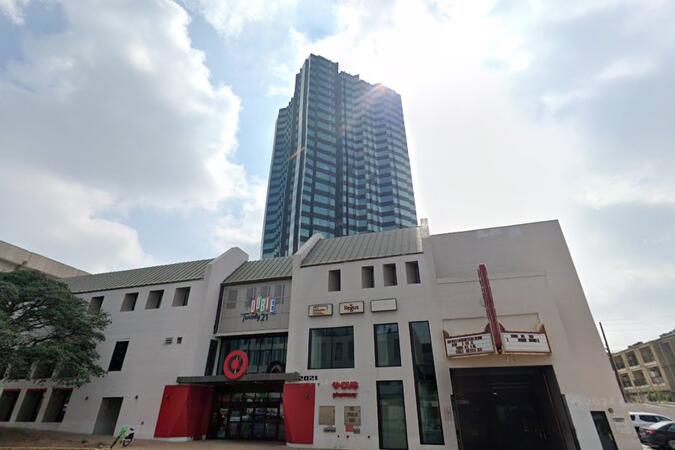
Austin, TX – Regus at Dobie Center

2021 Guadalupe Street, Suite 260, Austin, United States, 78705

The venue is located in the vibrant West Campus neighborhood near the University of Texas at the Dobie Center, easily reachable by car via I‑35 or I‑35 Frontage Road and Loop 1, with on-site and street parking nearby. From Austin–Bergstrom International Airport (AUS), about 11 miles southeast, a taxi or rideshare takes around 20–25 minutes via TX‑71 West and I‑35 North. Public transit users can take Capital Metro routes to the University of Texas/Dobie Mall stop directly in front of the building, placing it within a short walk for attendees without cars.

Austin, TX - Regus - Littlefield Congress

106 E 6th St, Austin, United States, 78701

The venue is conveniently situated near I‑35 and US‑183, making it easily accessible by car, with both public and garage parking options—such as the Littlefield Garage at 508 Brazos—located within walking distance. For those using public transportation, the venue is just a short walk from the Downtown Station (CapMetro) and is served by several bus routes. Travelers arriving by air will find that Austin-Bergstrom International Airport is approximately 8 miles away, providing straightforward access to and from the venue.

Subcategories (3)

Explore Our Courses

Microsoft 365 for Teams, OneDrive, Planner & Copilot: Productivity and Governance

14 Hours

Microsoft 365: Building Advanced Knowledge Management Systems

14 Hours

Microsoft Intune: Modern Endpoint Management and Security

21 Hours

Microsoft 365 for Leaders: Advanced Productivity and Copilot Integration

30 Hours

Microsoft To Do: Personal Productivity and Team Collaboration

14 Hours

Microsoft To Do Essentials - 1 Day

7 Hours

System Center Data Protection Manager (DPM) Backup and Recovery

35 Hours

Microsoft 365 Productivity Tools: Teams, OneDrive, and Outlook

14 Hours

Microsoft 365 Productivity Tools: Outlook, OneDrive, Teams, Planner, and Forms

14 Hours

Microsoft Exchange Server Administration

35 Hours

Microsoft OneNote for Organization and Collaboration

7 Hours

Task Management with Microsoft Planner

7 Hours

Microsoft 365 Essentials: Teams, Word, and Excel

14 Hours

Excel: Basic, Intermediate, Advanced

10 Hours

System Center Operations Manager (SCOM) Administration and Monitoring

35 Hours

Excel for Inventory, Budgeting, and Data Analysis

14 Hours

Microsoft 365 Administration and Security Essentials

35 Hours

Microsoft Excel (Basic, Intermediate, and Advanced)

28 Hours

Excel and Google Sheets

14 Hours

Microsoft 365 Administration and Security

35 Hours

Excel Modelling

7 Hours

Hyper-V Virtualization

21 Hours

Working Efficiently with OneNote

7 Hours

Excel Advanced

14 Hours

Excel VBA Introduction

14 Hours

Excel For Statistical Data Analysis

14 Hours

Excel to Power BI

7 Hours

Excel Basics

14 Hours

Financial Analysis in Excel

14 Hours

Excel in One Day

7 Hours

Analysing Financial Data in Excel

14 Hours

Python for Excel

14 Hours

AZ-400T00-A: Designing and Implementing Microsoft DevOps solutions

35 Hours

Working with spreadsheet in Microsoft Excel

14 Hours

Excel Advanced with VBA

21 Hours

Visual Basic for Applications (VBA) in Excel (intermediate level)

14 Hours

Microsoft Office Excel - working effectively with the spreadsheet

14 Hours

Visual Basic for Applications (VBA) for Analysts

21 Hours

Excel and VBA Programming for Audit and Finance Professionals

28 Hours

Excel Data Analysis

14 Hours

Managing Modern Desktops (MD-101T00)

35 Hours

Office 365 Administrator (authorized training MS 030)

35 Hours

MS 040: Manage SharePoint and OneDrive in Microsoft 365 (authorized training course)

21 Hours

SharePoint Hybrid Deployment and Migration (MS-050T00)

35 Hours

MS 100 Microsoft 365 Identity and Services

35 Hours

MS-100: Microsoft 365 Identity and Services

35 Hours

MS-101: Microsoft 365 Mobility and Security

35 Hours

Office 365 Administration and Troubleshooting MS-10997 (Retired)

21 Hours

MS 500: Microsoft 365 Security Administration (authorized training course)

28 Hours

MS-600T00: Building applications and solutions with Microsoft 365 core services

35 Hours

MS-700T00: Managing Microsoft Teams

28 Hours

Last Updated:

Testimonials (5)

Upcoming Courses

Online Microsoft training in Austin, Microsoft training courses in Austin, Weekend Microsoft courses in Austin, Evening Microsoft training in Austin, Microsoft instructor-led in Austin, Microsoft trainer in Austin, Microsoft boot camp in Austin, Microsoft classes in Austin, Microsoft one on one training in Austin, Online Microsoft training in Austin, Microsoft on-site in Austin, Microsoft instructor-led in Austin, Weekend Microsoft training in Austin, Microsoft instructor in Austin, Evening Microsoft courses in Austin, Microsoft coaching in Austin, Microsoft private courses in Austin